Academy courses
Create images
Describe, adjust style and light, and get images ready for social media.
0 of 4 lessons
By the end you will
- Describe a scene with subject, setting, light and style.
- Use aspect ratio and negative prompt.
- Speed up with / style shortcuts such as /podcast.
- Make a consistent set of images for a brand.
Lesson 1 · 5 min
Describe the scene
Write image prompts with the four key pieces.
- Subject: what or who appears.
- Setting: where it happens.
- Light and mood: morning, neon, dramatic.
- Style: photo, watercolor, 3D, anime.
A barista pouring latte art in a small coffee shop, warm morning light, photorealistic, close-up.
Your turn: write your promptImage prompt
Write your own version for your case. The Academy coach checks with rules whether it has every part, what is missing and suggests a version to complete. It is instant, not sent to the chat and does not use your plan.
- The subject and what it is doing
- Setting, light and time of day
- Style or medium (photo, illustration, 3D…)
- Framing, colors and space for text if needed
If your training permission is on (Settings → Privacy), your prompt and the review may be used, without personal data, to improve Drommo's models.
- 1
Describe and send
Tap Image (1), describe the subject, the place, the light and the style (2) and send (3).
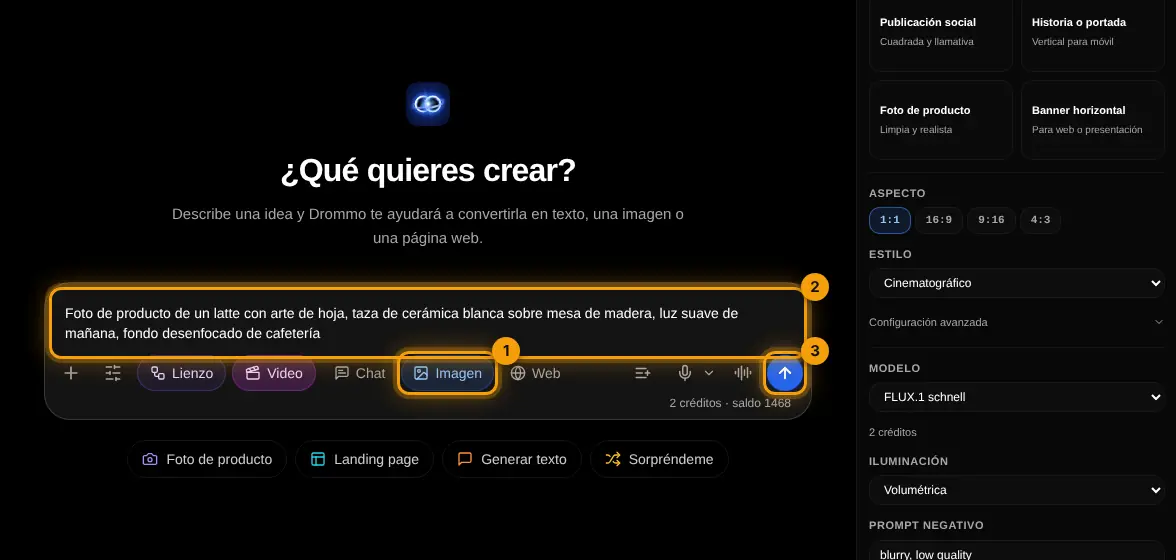
Challenge: Create the same subject in three styles: photo, watercolor and 3D.
Lesson 2 · 4 min
Format, style and negative prompt
Control the result from Settings.
- Vertical for stories and reels, square for the feed, horizontal for banners.
- Style and lighting presets save words in your prompt.
- The negative prompt removes what you do not want: "text, blur, extra fingers".
- 1
Adjust in Settings
In Image mode the panel shows the aspect ratio (1), the style (2) and the negative prompt (3) with what you do not want to see.
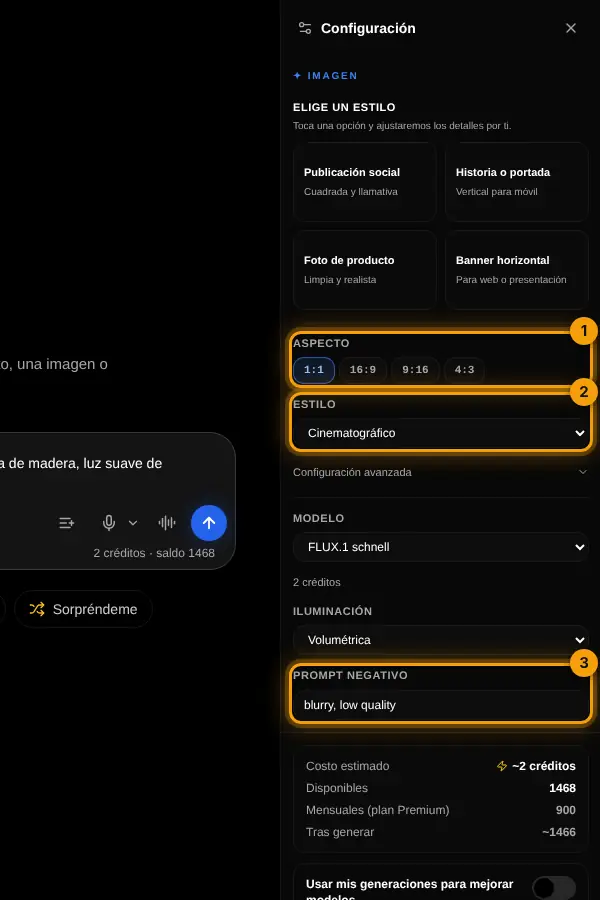
Challenge: Make a vertical story image and a square post from the same idea.
Lesson 3 · 4 min
Style shortcuts with /
Get a professional scene with two words.
- 1
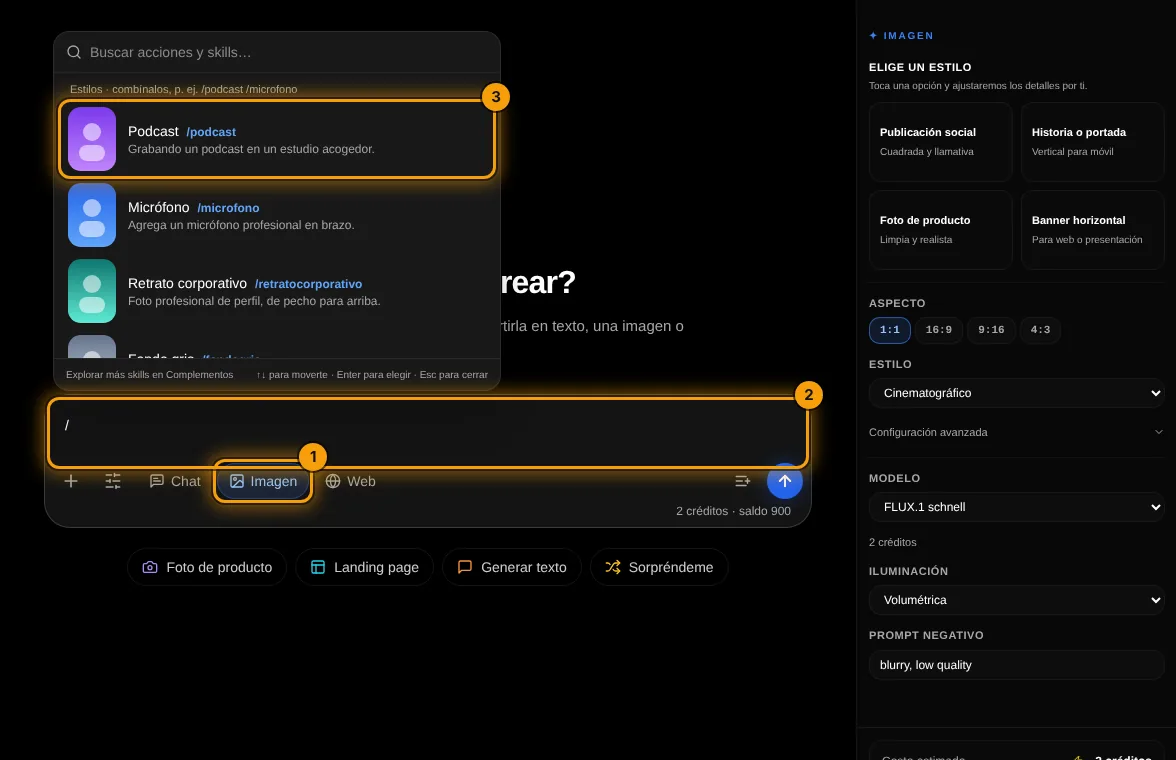
Type / in Image mode
With Image selected (1), type / in the box (2). The list shows each style with its preview (3); search by name to filter it.
- 2
Combine and describe
Pick one, type / again to add another (4), write who or what appears and send (5). Drommo turns the shortcuts into a complete prompt.
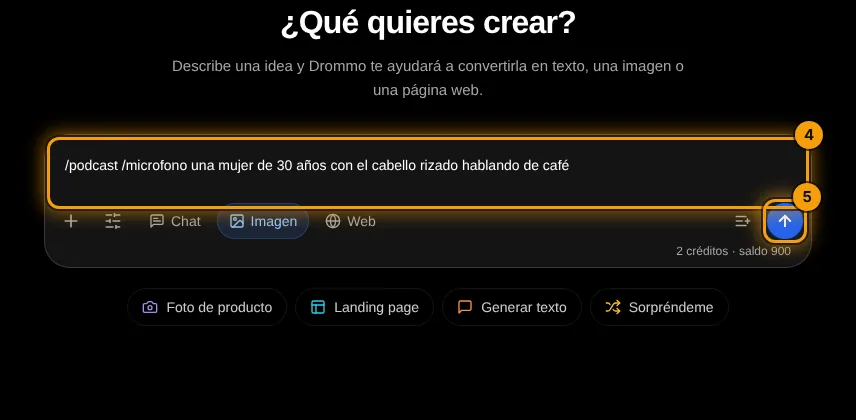
/podcast /microphone a man in his 40s with glasses, friendly smile
Your turn: write your promptImage prompt
Write your own version for your case. The Academy coach checks with rules whether it has every part, what is missing and suggests a version to complete. It is instant, not sent to the chat and does not use your plan.
- The subject and what it is doing
- Setting, light and time of day
- Style or medium (photo, illustration, 3D…)
- Framing, colors and space for text if needed
If your training permission is on (Settings → Privacy), your prompt and the review may be used, without personal data, to improve Drommo's models.
Attach your own photo and the shortcut keeps you in the new scene. Use photos of other people only with their permission.
Challenge: Make your profile photo with /corporateheadshot and a second one with /podcast.
Lesson 4 · 6 min
A set for your brand
Keep colors and style consistent across images.
Repeat the same style sentence at the end of every prompt, for example "flat illustration, teal and coral palette, white background".
A yoga mat and a plant, flat illustration, teal and coral palette, white background.
Your turn: write your promptImage prompt
Write your own version for your case. The Academy coach checks with rules whether it has every part, what is missing and suggests a version to complete. It is instant, not sent to the chat and does not use your plan.
- The subject and what it is doing
- Setting, light and time of day
- Style or medium (photo, illustration, 3D…)
- Framing, colors and space for text if needed
If your training permission is on (Settings → Privacy), your prompt and the review may be used, without personal data, to improve Drommo's models.
- 1
Download or ask for a variation
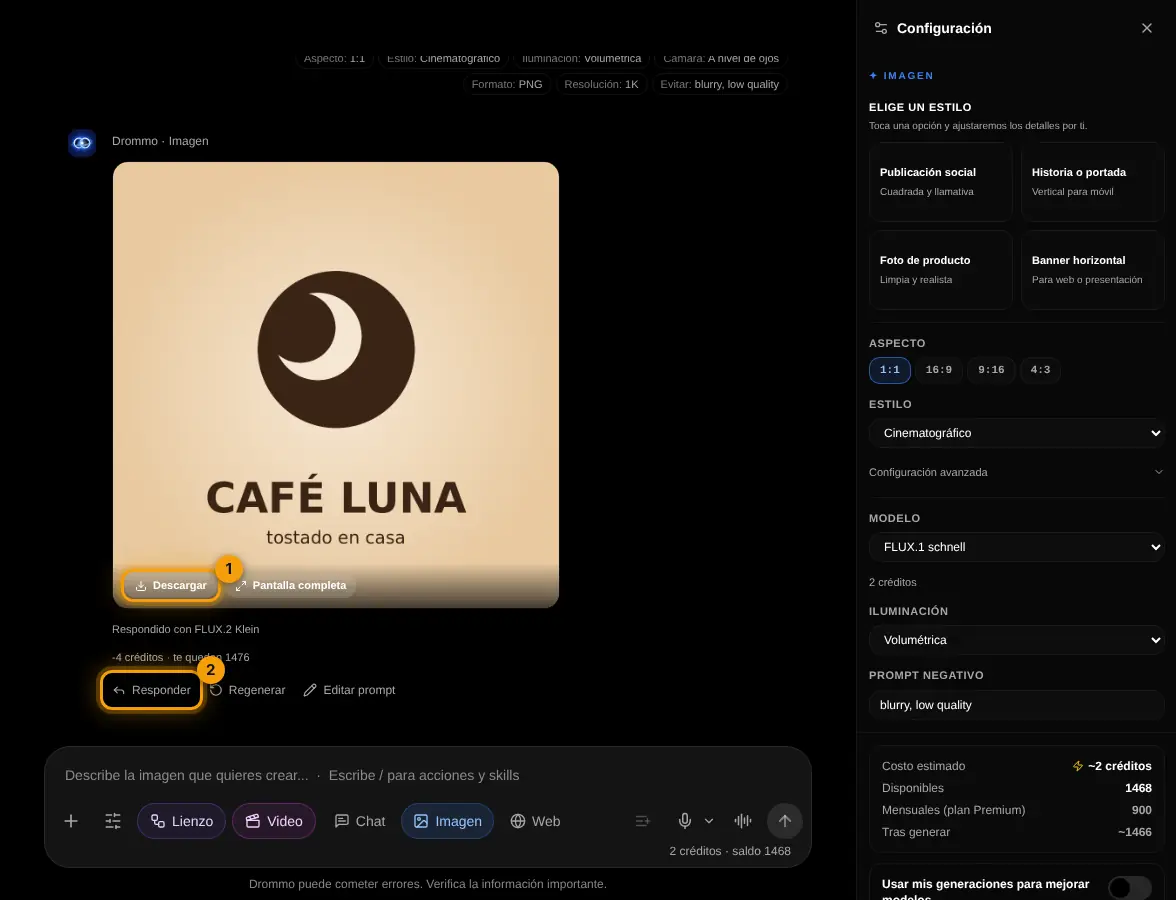
Hover the image to Download it (1). Reply (2) asks for another version with the same style, for example "same logo on a dark background".
Challenge: Create 3 images for one week of posts with the same style sentence.
Final exam and certificate
Answer the questions. With 80% or more you get your Drommo Academy certificate with your name and the date you finished. You can try as many times as you want.
In the documentation