Documentation menu
Tools
Images
Create images from a description and refine them with styles, / shortcuts and references.
Image options
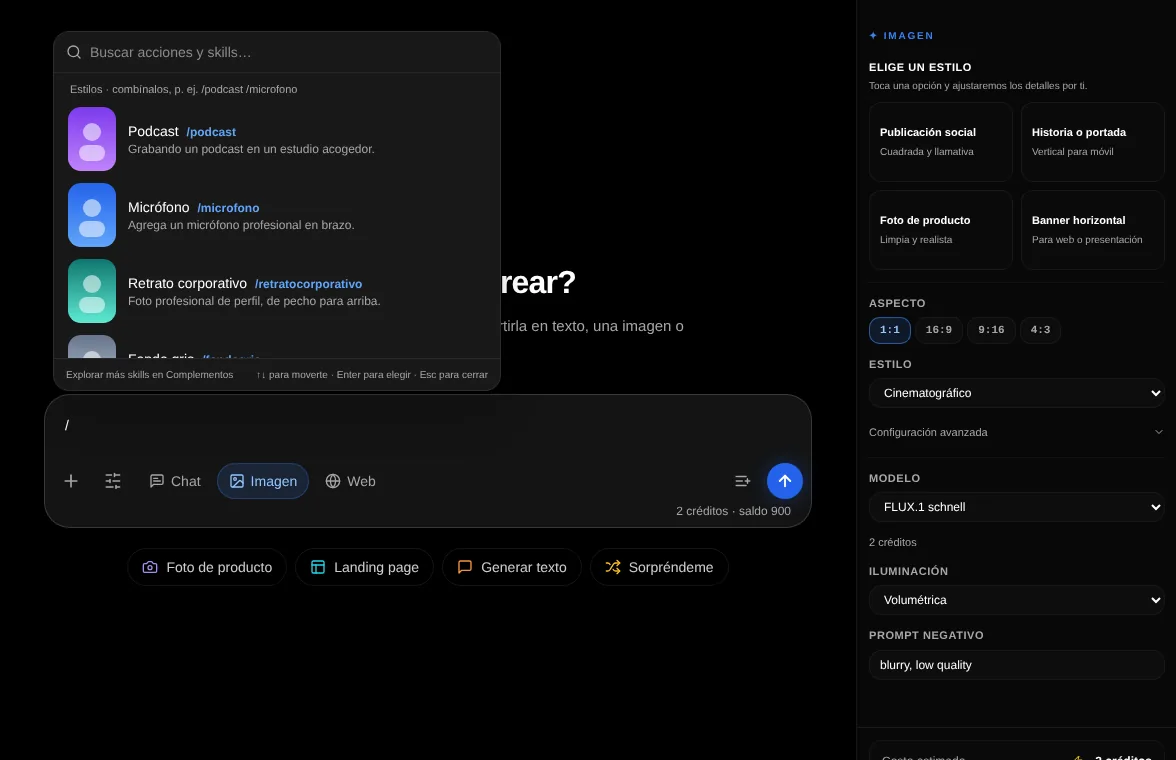
| Option | What it does |
|---|---|
| Model | Chooses the image model. Each one has its own quality and speed. |
| Aspect | Square, vertical or horizontal format. |
| Style | Cinematic, photorealistic, watercolor, anime, 3D animation and more. |
| Lighting | Studio, sunset, neon, volumetric or moody. |
| Negative prompt | What you do not want in the image, for example "text, blur, extra fingers". |
Style shortcuts with /
In Image mode, type / in the message box and a list of style shortcuts opens, each with a preview. A shortcut is a reserved word that Drommo turns into a complete prompt before sending it: /podcast places the subject in a podcast studio, /corporateheadshot makes a profile photo, /watercolor paints it. You can combine several, such as /podcast /microphone, and add your own description after them. Spanish and English shortcuts both work.
| Group | Shortcuts |
|---|---|
| Professional photos | /corporateheadshot, /profilephoto, /greybackdrop, /whitebackdrop, /blurredback, /officewindow, /businessmagazinecover, /podcast, /microphone, /keynotespeaker, /tvinterview, /videothumbnail, /coffeeshop, /homeoffice, /coworking |
| Jobs and roles | /chef, /doctor, /astronaut, /superhero, /knight, /cowboy, /rockstar, /dj, /soccerplayer, /fitness, /yoga, /graduation, /wedding |
| Places and seasons | /beach, /mountain, /citynight, /paris, /newyork, /tokyo, /winter, /christmas, /halloween |
| Light and camera | /goldenhour, /studiolight, /blackandwhite, /cinematic, /neon, /film35mm, /closeup, /fullbody, /nineties |
| Art styles | /anime, /cartoon3d, /watercolor, /oilpainting, /comicbook, /pixelart, /actionfigure, /caricature, /sticker, /pencilsketch, /claymation |
- With a reference photo of a person, the shortcut keeps that person and changes the scene, the light or the style.
- Every shortcut is tested on Drommo's own image models before it is offered, so the list only shows the ones that work.
- Use photos of people only if it is you or you have their permission.
/corporateheadshot /greybackdrop smiling, navy blazer [attach your photo]
Reference photos and the canvas
To combine photos, keep a character across images or edit a result, open the image canvas with the Canvas button next to the message box in Image mode. The / style shortcuts work there too. Its page explains every tool.
Image prompt examples
Studio portrait of an older fisherman with a white beard, wool cap, dramatic side light, black background, 85 mm lens.
Related topics